
From First Draft to Classroom-Ready
Planning rarely ends when the first resource is created. A unit plan has to become a lesson. A lesson has to become student-facing materials. A reading may need scaffolds. Questions may need revision. Some students may need sentence stems, translations, or additional supports. And before anything goes in front of students, teachers need to know whether the material is appropriate for the learners in their classroom.
That is the work behind our latest Eduaide release. The focus is what happens after a resource exists: checking whether it fits the class, revising it in context, adding scaffolds, and adapting it for different learner needs.
Meet Erasmus 2.0, Eduaide's new document chat assistant

Erasmus brings chat directly into the document editing experience in Eduaide.
Earlier versions of Erasmus lived apart from the document editor. Teachers could ask questions, think through ideas, and plan next steps, but the chat assistant was separate from the resources they were building.
That separation did not match how planning actually works.
Eduaide already gives you a large library of resources, games, organizers, evaluation tools, and adaptation options. But classrooms often call for a specific change that does not fit neatly into a preset tool.
Those are the moments where a document assistant shines.
With the new assistant, you can ask for specific changes in plain language. The assistant can read the document you have open and suggest targeted edits inside the editor, helping you make custom revisions while keeping materials grounded in the instructional context of the lesson.
Instead of copying content into a separate chat, asking for revisions, pasting the response back, and reformatting everything by hand, you can now revise the document where the work is already happening.
You can use the chat assistant to:
- Add checks for understanding throughout a reading
- Revise short-answer questions into a mixed question set
- Rewrite sections of a document
- Remove or reorganize content
- Add directions for an activity
- Create an annotation guide
- Adjust formatting and spacing
- Draft captions or student-facing prompts
When a resource is close but not quite ready, the document assistant gives you a practical way to make the final changes that matter.
Evaluate materials before they reach students
AI can help teachers create instructional materials quickly, but a faster first draft is still a first draft.
Before a resource goes in front of students, you need to know what that material is asking students to do. Is the reading level appropriate? Are the sentences too complex? Does the vocabulary need support? Does the text assume background knowledge students may not have? Are there places where students may need scaffolding to access the content?
That is why Eduaide includes Evaluation tools as part of the planning workflow.
Rather than treating AI-generated materials as finished the moment they are created, Evaluation gives teachers a way to review them with more care. It helps surface what is working, what may be difficult for students, and what kinds of changes or supports could make the material more usable.
These tools can be used with resources created in Eduaide, existing classroom materials, or content generated in other AI platforms. The goal is not to label a resource as good or bad. The goal is to help you understand how ready a material is for student learning.
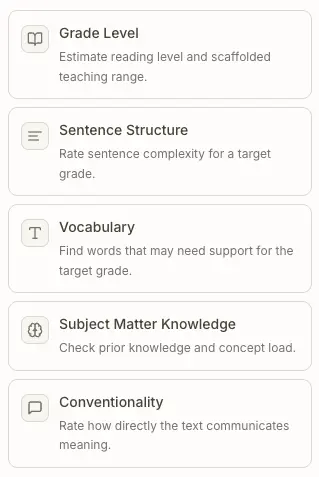
Eduaide currently supports five evaluator types:
- Grade Level estimates the independent reading range, identifies where the text may be teachable with support, and can create a scaffolded version.
- Sentence Structure evaluates syntax complexity for a target grade.
- Vocabulary identifies Tier 2, Tier 3, archaic, and other complex words that may need support.
- Subject Matter Knowledge surfaces prior knowledge demands, concept load, and scaffolding guidance.
- Conventionality checks how directly the text communicates meaning, including abstract, implicit, figurative, or archaic language features.
Each evaluation provides rationale, highlights areas that may need attention, and helps you decide what to do next. Sometimes that next step is a targeted revision with the document assistant. Sometimes it is an Adapt option, such as adding sentence stems, simplifying the reading, creating a guided reading activity, or translating the material. And sometimes the evaluation confirms that the resource is already in a strong place.
In the Planning Period example, a student reading is intended for an eighth-grade class but evaluates as more independently accessible for ninth- or tenth-grade readers. That does not mean the resource needs to be thrown away or rebuilt from scratch. It means you now have useful information: students may be able to access the text with the right supports.
That is the value of Evaluation. It gives you a clearer view of the materials you are creating or bringing into Eduaide, so you can make informed decisions before those resources reach students.
Adapt and differentiate for different learners
Once a material has been created, evaluated, and revised, teachers often need to make it work for different students.
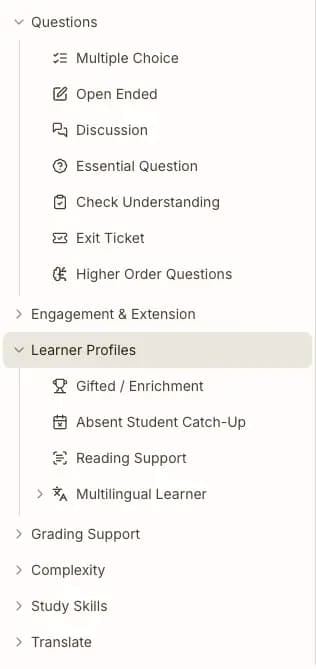
That might mean adding an answer key, creating discussion sentence stems, lowering the complexity of a reading, translating the material, building a study guide, or creating an enrichment version for students who are ready to go deeper.
Eduaide's Adapt tools are built for those moments.
Instead of starting over or creating every support from scratch, you can use one-click differentiation options to add to the current document, adjust the material for a specific learner need, or create companion resources that support the same instructional goal.
Adapt options help you:
- Add questions, checks for understanding, exit tickets, and discussion prompts.
- Create grading supports like answer keys and rubrics.
- Adjust complexity by chunking text, changing reading level, summarizing, or expanding a resource.
- Support multilingual learners with proficiency-level supports and translations.
- Build study tools like sentence stems, flashcards, keywords, and study guides.
- Extend learning with enrichment activities, higher-order questions, and discussion protocols.
This makes differentiation part of the same planning workflow rather than a separate task to complete later.
You can create a background reading, evaluate its level, create a scaffolded version, revise it with the document assistant, add an answer key, generate sentence stems for student discussion, and translate the material for multilingual learners, all while continuing to work from the same instructional resource.
The goal is not just to make more versions of a document. It is to help you respond to what students need next, whether that means more access, more structure, more challenge, or more ways to engage with the material.
A more powerful Eduaide workspace
Together, Erasmus, Evaluation, and Adapt make the Eduaide workspace more useful after the first draft is created.
You can generate a resource, check how ready it is for student learning, make targeted revisions, and add the supports different students need without leaving the flow of planning. That makes Eduaide more than a place to create materials. It becomes a workspace for improving them.
These features are available as part of the Eduaide Pro plan. If you are ready to spend less time rebuilding resources from scratch and more time shaping them for the students in front of you, check it out today.