
AI Lesson Plan Generator
Free account · up to 8 lesson plans a month · no credit card
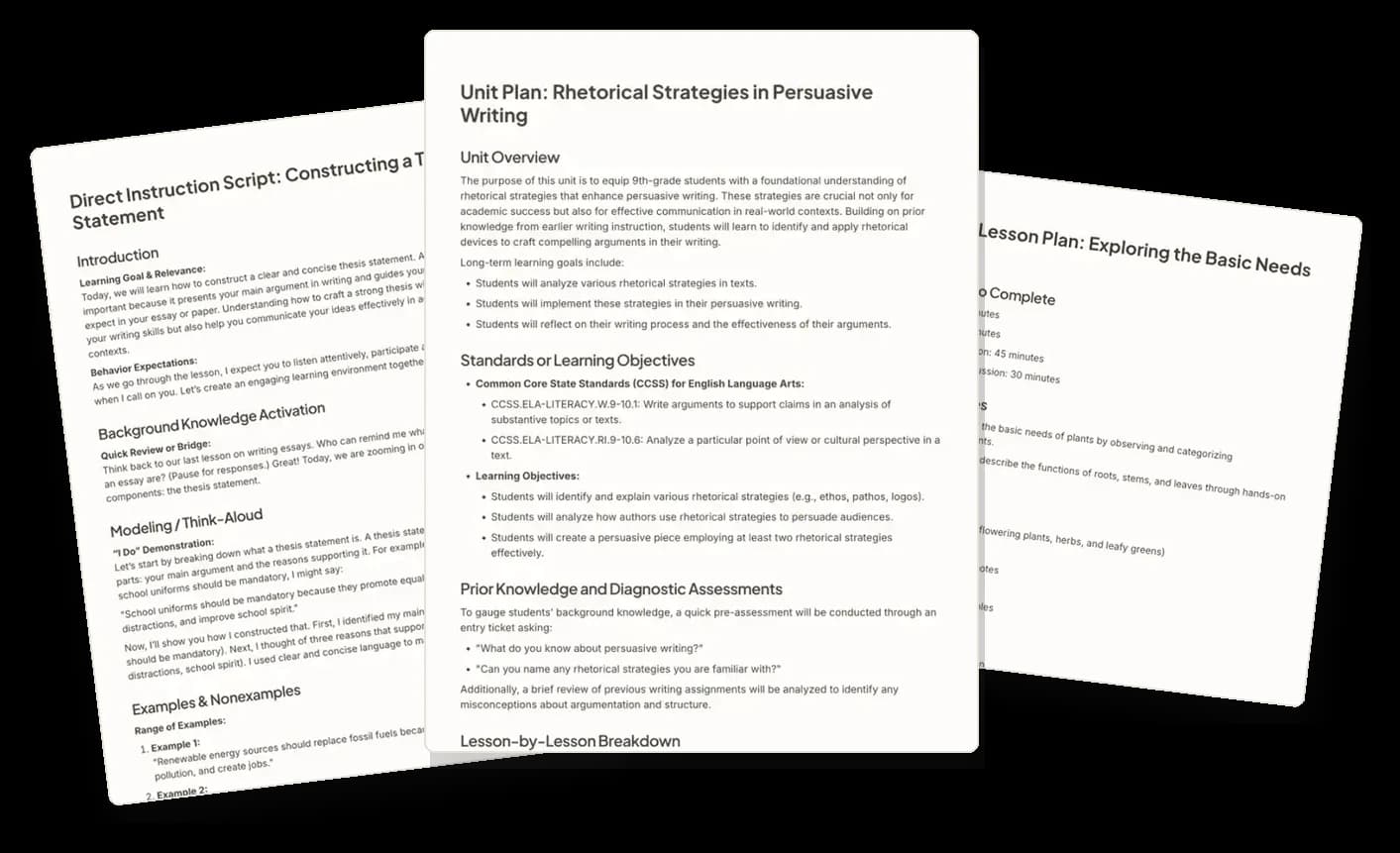
Generate lesson plans in 11 instructional models
5 E's Lesson Plan
Create a structured 5E lesson plan with engaging, exploratory, explanatory, and evaluative learning experiences.
Example objective: Students will explain a scientific concept by connecting observable phenomena to underlying principles.
Unit Plan
Design a structured, research-based unit plan with explicit instruction, assessments, and spaced practice for mastery.
Example objective: Students will obtain, evaluate, and communicate information about how cellular structures and processes interact to maintain life.
Backward Design (UbD) Organizer
Create a UbD unit plan with clear goals, authentic assessments, and inquiry-driven learning experiences.
Example objective: Students will model real-world situations using functions by selecting, constructing, and interpreting appropriate mathematical representations.
Hunter's Model - Mastery Learning
Create structured lesson plans with 8 elements, including modeling, guided practice, checks, and closure.
Example objective: Students will assess the effect of word choice on tone by examining connotative and figurative language.
Gagné's Nine Events of Instruction
Create a lesson plan using Gagné's Nine Events of Instruction with activities for each phase.
Example objective: Students will explain the relationship between force, mass, and acceleration by applying Newton's Second Law.
Universal Design for Learning (UDL) Planner
Create a UDL-aligned lesson plan with multiple means of engagement, representation, and expression for all learners.
Example objective: Students will solve linear equations in one variable by using inverse operations and justifying each step to maintain equality.
Project Based Learning (PBL) Planner
Create a structured PBL plan with inquiry-driven learning, real-world connections, and student-driven projects.
Example objective: Students will explain why political boundaries change by connecting conflict, cooperation, and sovereignty.
Montessori Lesson Plan
Create three Montessori-aligned lesson plans with hands-on tasks, simple materials, and teacher prep guidance.
Example objective: Students will understand the basic needs of plants by observing and categorizing environmental requirements.
Student-Centered Approach
Create a student-centered learning framework with active participation, autonomy, and structured progression.
Example objective: Students will explain the spread of Enlightenment ideals by connecting new ideas about reason and rights to political change.
SPARK Lesson
Create a SPARK lesson plan that applies real-world problem-solving, creativity, and human-centered learning experiences.
Example objective: Students will analyze how scientific models explain complex processes by evaluating their strengths, limitations, and explanatory power.
Lesson Seed
Brainstorm lesson ideas with objectives, direct instruction, practice, team activities, and formative assessment options.
Example objective: Students will develop and apply formulas for the area of triangles, parallelograms, and trapezoids and solve real-world problems involving perimeter and area.







How the AI lesson plan generator works
- Step 1
Pick an instructional model
Select the lesson or unit framework you plan in, from a daily 5E lesson to a full Backward Design unit.
- Step 2
Describe the lesson
Set the grade level and enter your objective, topic, or standard. Paste or import source material when the lesson is built around a text.
- Step 3
Refine and export
Edit the draft in the workspace, evaluate it, then export it to Google Docs or Word.
The generated plan is a starting point, not the deliverable
Edit the draft
Every generated plan opens in the document editor. Rewrite sections, cut activities, and change wording before anyone else sees it.
Evaluate the text
Run a generated plan or its student-facing materials through an evaluator and read its feedback on the document.
Apply the revisions
Requires ProTurn an evaluator's suggestions into edits to the document in one step, instead of making each change by hand.
Export where you teach
Send the finished plan to Google Docs or Microsoft Word.
Differentiate for your class
Requires ProAdapt a plan's reading level and supports for the students in front of you, either in place or as a new version.
Revise with Erasmus
Requires ProTalk to the document. Ask for a shorter warm-up, a different hook, or an extra formative check, and apply the result.
Up to 8 lesson plans a month, free
Planning for a whole school or district? See school licensing
What teachers ask before they try it
Which lesson plan formats can Eduaide generate?
11 lesson and unit structures, listed in full above. They include the 5E model, Backward Design (UbD), Hunter's Model, Gagné's Nine Events of Instruction, Universal Design for Learning, Project Based Learning, and Montessori. You choose the model before you generate, so the draft arrives in the format you are expected to submit.
Can ChatGPT write lesson plans?
Yes. A general chatbot can draft a lesson from a prompt. Eduaide is built for this one job: you choose the instructional model first, enter the grade and the objective or standard, and the plan opens in an editor where you can evaluate and export it.
Is there a free version?
Yes, and it does not ask for a credit card. Eduaide Free includes 24 generation credits a month. A lesson or unit plan costs 3 credits, so that is up to 8 plans a month. Eduaide Pro removes the monthly limit.
Do I need an account?
Yes. Generation runs against your account, which is what lets a plan save to your history, reopen in the workspace later, and stay available when you come back to revise it before the unit starts.
Can I change what it generates?
Every plan opens in the document editor, where you rewrite sections, delete activities, and adjust wording. Nothing is published anywhere or shared with students until you export it yourself.
Can I build the plan around a standard or my own materials?
You set the grade level and enter a learning objective, a topic, or a standard. When the lesson is built around a text you already use, you can import a document or a web page as supplementary context. Importing a YouTube transcript requires Eduaide Pro.
How do I get the plan out of Eduaide?
Export it to Google Docs or Microsoft Word, then print, share, or attach it the way your school already does.
Related Solutions and Resources
Where Good Ideas Become Great Lessons
Start with an objective, a topic, or a source. Leave with classroom-ready materials you can teach from.